Photographers often find themselves facing an important decision: shooting in RAW or JPEG. Both formats bring their own pros and cons, and knowing these differences can absolutely change how you work with your camera and handle photos after shooting. I want to break down what makes RAW and JPEG unique, where each one really shines, and how to figure out which format is best matched for your needs, whether you’re just getting started or ready to take things up a notch.
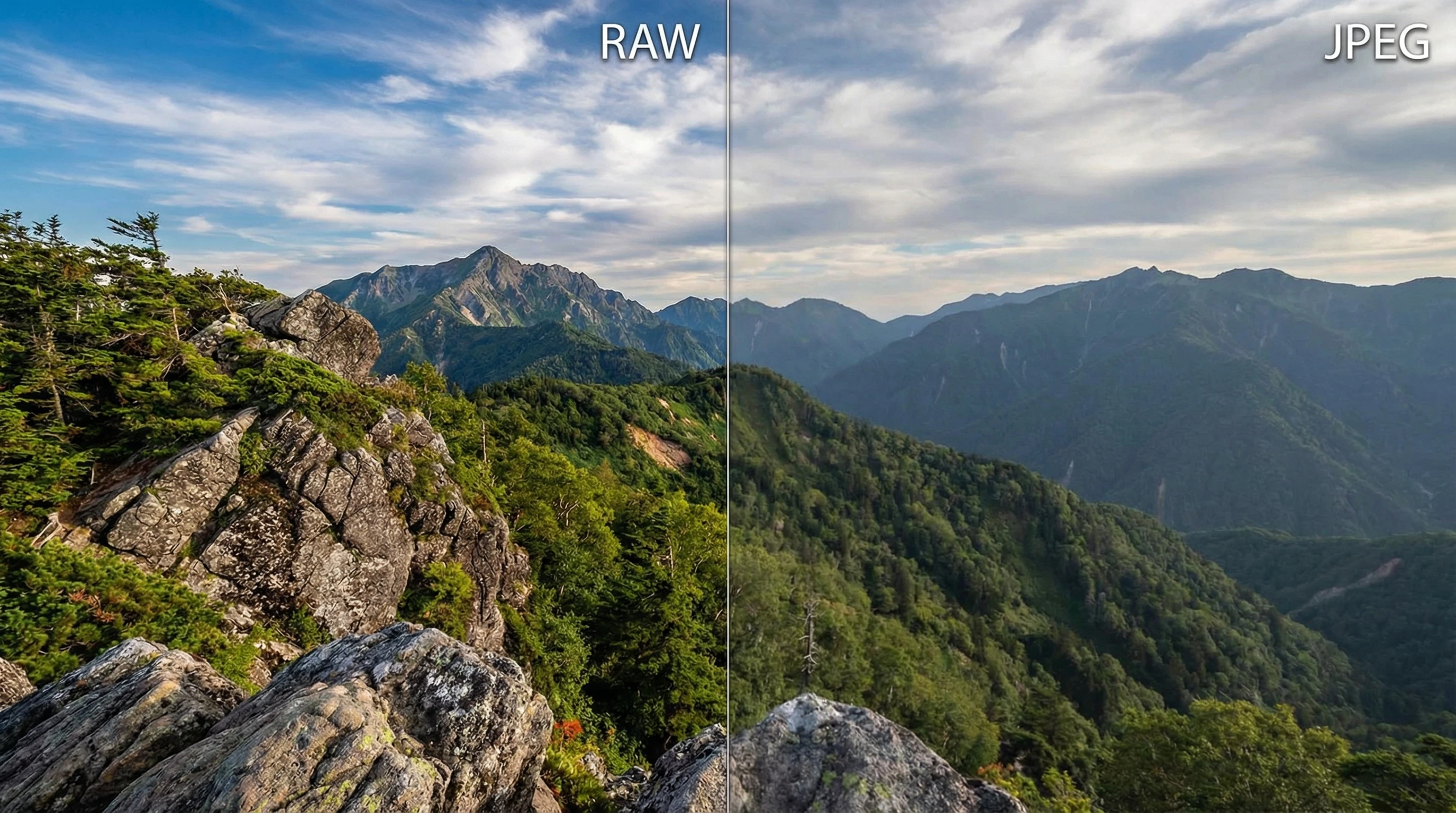
What is RAW? What is JPEG? Here’s the Basic Difference
RAW and JPEG are both image formats you’ll find in almost any digital camera, but they work very differently. When a camera shoots in RAW, it captures all the data from the sensor with almost no processing. It’s basically a digital negative—packed with detail and information, but not quite ready for sharing straight from the camera. RAW files usually need editing in programs like Lightroom, Capture One, or Darktable before you can share them or make prints.
JPEG, in contrast, is an image format that your camera processes for you. The camera applies tweaks to things like color, contrast, and sharpening, and then saves the photo as a compressed, smaller file. JPEGs are ready to use straight out of the camera. Most smartphones, point and shoot cameras, and even many DSLRs shoot JPEG by default because of the convenience.
Why Understanding RAW and JPEG Matters
Picking the right format isn’t just about technology. It affects your workflow, the amount of time you spend editing, and even the quality of your final images. Professionals or hobbyists who want full creative control usually lean toward RAW. People who want fast and simple results stick with JPEG. Knowing which format fits your goals helps you avoid frustration and get the most out of your photography adventure.

Breaking Down the Practical Differences
- Image Quality: RAW files have more detail, dynamic range, and color information. JPEGs compress a lot of that away to keep file sizes manageable.
- File Size: JPEG images are often less than one-tenth the size of a typical RAW file, which is a big help for saving space.
- Edit Flexibility: RAW gives you way more freedom for adjusting things like exposure, white balance, and shadows or highlights. JPEG is pretty much “locked in”—major changes can lead to banding or other problems.
- Speed: JPEG is faster if you want to shoot, share, or upload images right away. RAW requires some extra time in post-processing.
- Camera Buffer: Shooting big RAW files can slow down burst shooting modes on some cameras compared to shooting JPEG.
Getting Started: Figuring Out Which Format to Use
If you’re not sure yet what format to use, the choice really comes down to what you care about most: top quality or convenience? Here’s my take on a few typical situations:
- Casual Snaps: When I’m just capturing quick memories or posting right to social media, JPEG works perfectly. No need for extra editing or oversized files.
- Learning Photography: Shooting RAW helped me get a real sense of how my camera interacts with light and color. I can recover more when my exposure is off, and see the results of different edits without ruining the photo.
- Client Work or Prints: For paid shoots, creative projects, or pictures I plan to print big, I almost always pick RAW for the added detail and editing possibilities.

Things You’ll Want to Think About Before Picking RAW or JPEG
Each format comes with its own quirks and things to consider. Here are a few points I always keep in mind:
- Storage Needs: RAW files take up a lot more SD card and hard drive space. If you shoot hundreds of photos in a session, be sure you have ample storage or backup solutions.
- Software: Editing RAW files requires photo processing software. Some programs are free, but many (like Lightroom) require a subscription or upfront payment. JPEGs, in contrast, can be seen and edited easily on almost any device.
- Speed to Output: RAW files slow you down if you need to turn photos around fast, like for events or rapid social media sharing. JPEG keeps your workflow moving quicker.
- Battery Life: Some cameras burn through more battery when working with RAW files or when previewing/editing images on the go.
- Know-How: RAW files need extra knowledge to edit and manage. JPEG’s simplicity is great for people just getting into photography or anyone who wants to avoid complex software.
RAW Makes a Difference With These Kinds of Photos
- High Contrast Scenes: Saving bright skies or deep shadows is much easier with RAW files.
- Night Photography: Pulling detail out of lowlight shots feels a lot easier when editing RAW images.
- Portraits: Skin tones often appear more natural in RAW, especially when you want to avoid odd color tints or have more flexibility with touch ups.
- Landscapes: RAW allows you to bring out subtle color shifts and tiny textures that might disappear in JPEG.
When JPEG Is a Good Fit
- Action or Sports: Shooting long bursts quickly fills memory cards, so smaller JPEGs are usually way easier to deal with.
- Travel: If you don’t want to carry a laptop or spend spare time editing, JPEG lets you share memories instantly.
- Snapshots and Social Media: JPEGs are ready to go out by email, message, or upload immediately after shooting.

Expert Tips for Getting the Most From Each Format
Lock in Your Settings for JPEGs: I always double-check white balance, picture style, and sharpening before shooting JPEG. Fixing these later on a JPEG can be tough, so it pays to get them as close to perfect as you can in-camera.
Expose Smart for RAW: With RAW files, you can often pull back highlights and reveal more shadow detail, so it’s okay if your exposure isn’t absolutely perfect at the shoot.
Shoot Both Formats if You’re Unsure: A lot of cameras let you save both RAW and JPEG for each shot. I use this when I want quick previews but also want the option to make more serious edits later.
Back Up Your Files: Since RAW takes up much more space, managing and backing up your library becomes extra important. External hard drives and cloud storage are lifesavers for keeping images safe and organized.
Frequently Asked Questions
Question: If RAW is “better,” why do people bother with JPEG?
Answer: JPEG is quick, convenient, and easy to share. Not every photo needs to be massive or edited in detail; sometimes, practical matters win out over maximum image quality. Modern cameras also do a great job creating a JPEG with deliverable colours already so for those without time to edit or not needing major adjustments it can be a great option that saves space and time.
Question: Can I convert a JPEG into a RAW file?
Answer: You can save a JPEG in a RAW file format with some software, but you won’t recover the lost information. The extra data that helps with editing and flexibility is missing once the photo has been compressed into a JPEG.
Question: Are all RAW files the same across different cameras?
Answer: No, RAW file formats are different across brands and even camera models. Canon uses .CR2 or .CR3, for instance, while Nikon uses .NEF. Make sure the program you use for editing supports your specific camera’s RAW files.
Question: Is RAW really necessary for posting online or using smartphone cameras?
Answer: For sharing photos on the web or social media, JPEG is usually all you need. But, some smartphones now let you shoot in RAW, making it possible to edit your phone pictures more seriously if you want.

Real-World Uses for RAW and JPEG
From what I’ve seen, RAW and JPEG both absolutely belong in my workflow. For paid gigs or creative shoots, RAW puts me in the driver’s seat and gives maximum editing flexibility. In everyday life, family moments, or light travel, I grab JPEG to move faster and keep things simple. The real trick is knowing the result you want and matching your file format to that goal.
Keep experimenting with both, and soon you’ll spot what fits your style and needs. Balancing convenience, image quality, and storage goes a long way in helping you get the best shots, no matter what kind of photography you’re doing.