Capturing motion in photography brings a whole new level of excitement and energy to your shots. Whether I’m out at a skate park, shooting wildlife on the move, or just photographing friends running through a spray of water, knowing how to properly freeze or blur action is super useful. If you’re just stepping into the world of motion photography, getting your camera settings right and understanding how light and movement work together can make all the difference. Here’s my guide for getting started with freezing and blurring motion. It’s packed with tips, gear ideas, and common questions answered, all designed to help you set your action photos apart from the crowd.
Why Motion Photography Matters
Photos that capture movement stand out because they bring a sense of life and story to a single moment. Motion photography isn’t limited to sports, as it covers everything from waterfalls and rivers to animals in the wild or kids leaping off swings. The trick is controlling whether you want sharp, crisp action or that gorgeous blurred effect that shows off speed and makes a scene feel alive.
Learning these techniques lets you highlight energy, emotion, and details you might otherwise miss. The way you freeze or blur movement can totally change the mood and impact of a shot, creating images that truly stand out.
Setting Up for Motion Photography
Before jumping into the field, I always check my camera’s best features for shooting motion. Entry level DSLRs, mirrorless cameras, and even some newer phones now offer enough manual control to have fun with motion photography. Here are a few terms and camera settings you’ll see a lot:
- Shutter Speed: The main setting for freezing or blurring motion. A fast shutter speed (like 1/1000 sec) freezes fast action. A slow one (like 1/30 sec or slower) creates blur.
- Continuous Autofocus (AI Servo/AF C): This mode tracks moving subjects and keeps them in focus as they move across the frame, making it easy to shoot sports, wildlife, or playful kids.
- Burst Mode: Lets you shoot a burst of images super fast so you catch just the right split second, which can make a huge difference when capturing unpredictable movement.
Getting comfortable with these features helps you react quickly, which is really important for capturing movement since the best moments often happen in a flash. Having a little practice with your gear, even in your backyard, means you won’t fumble when that action moment comes along.
Quick Start Guide to Freezing and Blurring Action
When I’m out trying to capture action, these steps help me get the shot I want:
- Decide if You Want to Freeze or Blur: If you want sharp, clear moving subjects (like sports or wildlife), aim for high shutter speeds. For silky waterfall shots or speeding cars that look streaky, slow your shutter down.
- Adjust Camera Settings: Set your camera to Shutter Priority mode (often labeled “S” or “Tv”) or Manual mode. Pick a high shutter speed for freezing (like 1/1000 sec or higher). Go for a slower shutter for blur (start with 1/30 sec and experiment downward).
- Use a Tripod for Blurs: For cool blur effects, like trailing lights at night, a tripod keeps your background steady while the moving subject blurs. Even placing your camera on a steady surface can work in a pinch.
- Track Your Subject: If you want the subject sharp against a blurry background (this is called panning), move your camera smoothly with the subject as you take the shot. It’s a skill, but definitely worth practicing for dynamic images.
- Experiment: Settings depend on light and movement, so don’t be afraid to try different speeds and techniques. Digital cameras make it easy to test and adjust on the fly, so you can learn quickly what works for you in each scene.
Trying these steps is the best way to figure out your style and gain confidence handling motion in different settings. You’ll soon stumble upon your own tips and tricks as you shoot in different environments, from city streets to hiking trails.
Common Challenges with Capturing Motion
Like any skill, capturing fast action or beautiful blur takes practice and comes with its own challenges. Here’s what I run into most often:
- Lighting Issues: Less light means lower shutter speeds. If you want to freeze action, you need a lot of light or a higher ISO setting, which can add grain. Sometimes, getting creative with your shooting hours helps solve this problem.
- Missed Focus: Fast moving subjects can confuse autofocus. Using continuous autofocus modes and pre focusing on a spot can help. Sometimes, manually selecting a focus point in your camera can help you stay on target.
- Camera Shake: Especially when shooting slow shutter speeds, even a tiny shake ruins the shot. A tripod or lens with built in stabilization helps here, but holding your camera steady with proper hand holding technique makes a difference, too.
- Blown Out Highlights: In bright light, slow shutter speeds might overexpose your photo. Neutral density (ND) filters are handy for this problem because they cut light down like sunglasses, letting you slow the shutter even in daylight and keep your shot balanced.
Expect to mess up some shots. It’s part of the process! Every missed attempt usually means the next shot will be even better because you’re learning what to tweak. Don’t be discouraged by early failures. They’re part of every photographer’s adventure.
Lighting Considerations
Natural light changes fast, especially outside. For freezing action, I try shooting in bright sunlight or well lit areas. For creative blurs, I look for times when the light is lower, like around sunset or indoors, so my camera can use a longer shutter speed without overexposing. Sometimes, artificial lighting, like a flash or LED panels, gives you full control if you’re shooting indoors or after dark. Don’t be afraid to try out new light sources—you might stumble upon some unexpected and next level cool effects.
Gear Suggestions for Shooting Motion
If you’re serious about capturing movement, investing in a camera with manual mode, a sturdy tripod, and maybe a few extra tools for special effects can be really helpful. Here’s what I use and recommend:
- DSLR or Mirrorless Camera: Manual controls are key for adjusting shutter speed and autofocus quickly. These cameras handle movement well and open up plenty of creative opportunities.
- Fast Lens: Lenses with larger apertures (f/2.8 or wider) let in more light and help you shoot faster shutter speeds. You’ll feel the difference in low light, or when you want to blur the background.
- Tripod: For creative blurs or low light conditions, a basic tripod keeps your shots steady and helps you avoid frustrating shake.
- ND Filters: Neutral density filters let you use slow shutter speeds, even on bright days. They’re super useful for waterfall or long exposure shots, as well as for getting that dreamy look in midday sun.
Plenty of modern smartphones offer some manual control too, especially with third party apps. So, if you’re just starting out or don’t want to invest in more gear right away, your phone is a solid option for trying out basic motion effects. And, as features on phones keep getting better, you might be surprised by how much you can do before ever picking up a dedicated camera.
Advanced Techniques and Creative Ideas
Once you’re used to the basics, it gets really fun to push things further. Here are a few techniques that have helped my shots stand out and keep things fresh:
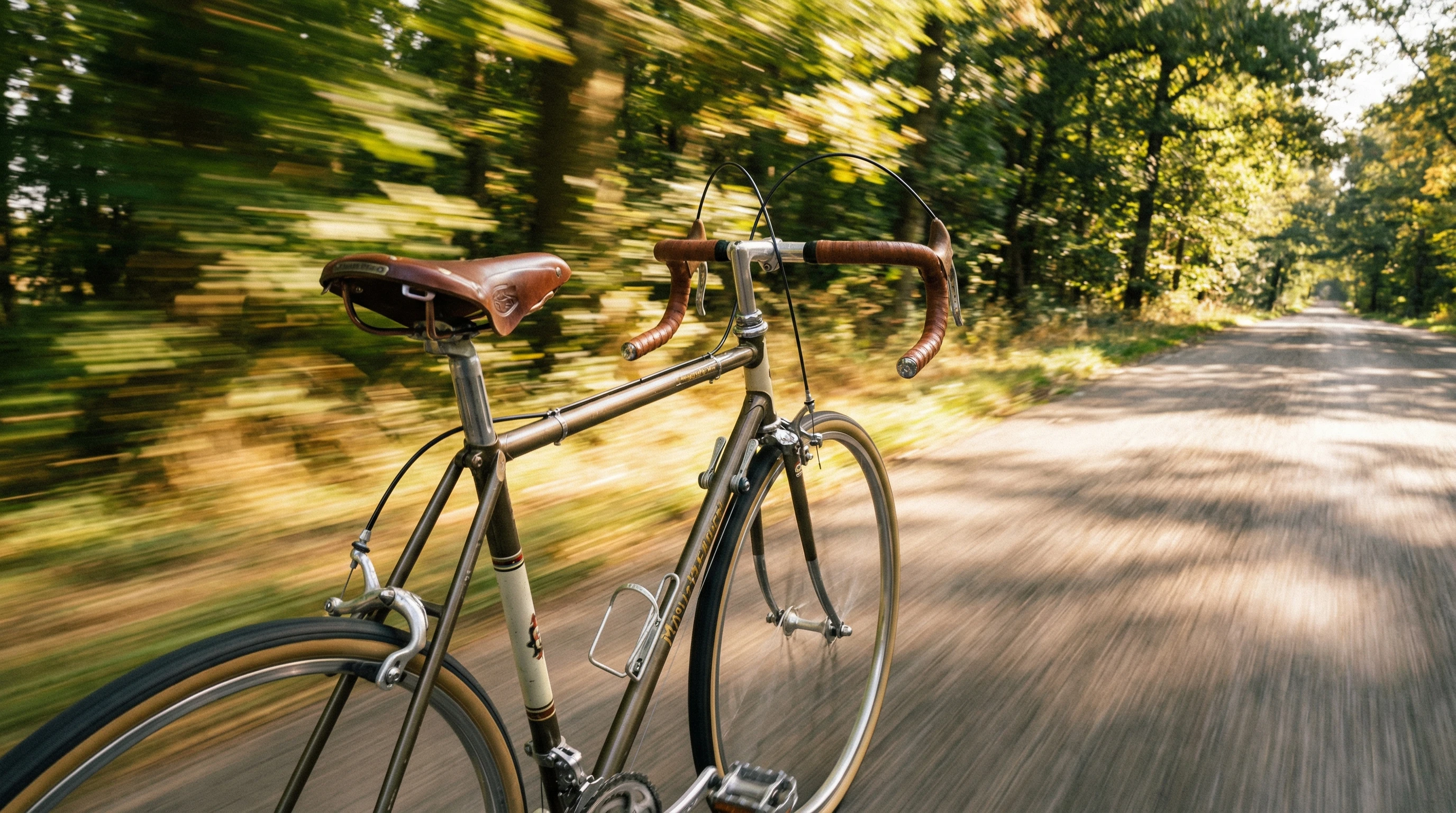
Panning Shots: Move your camera along with the moving subject at a slow shutter speed (like 1/30 sec). The subject stays sharp, while the background blurs horizontally. This is awesome for cars, bikes, or runners. With practice, you’ll get a feel for just how fast to move for maximum effect.
Zoom Blur: With a zoom lens, zoom in or out during your exposure. This works best with slow shutter speeds and creates striking, dynamic lines radiating from the center of the frame. It’s a cool way to add drama to otherwise simple scenes.
Light Trails: At night, slow your shutter and point at moving lights—cars, carnival rides, or city scenes. The lights leave colorful streaks that make your photos pop, lending energy to urban settings or nighttime parties.
Intentional Camera Movement (ICM): Try moving your camera in creative ways during an exposure to paint with light and color. No rules here, just experiment and see what you can make happen. Swirl, shake, or tilt your camera; the results can surprise you and help you stumble upon new styles.
Mixing these techniques with different subjects gives you loads of creative control for pretty unique images that take your photography up a notch. If you’re out shooting and things start to feel repetitive, trying these ideas can spark a whole new batch of inspiration.
Gear Focus: What Makes the Process Easier?
The right equipment makes capturing action less challenging and opens up even more creative options. Here’s what I find really helpful in real world situations:
- Sports Photography: Fast focusing cameras and long lenses catch distant action sharply, perfect for football or wildlife photos. Quick memory cards and burst mode make sure the best moments don’t slip by you.
- Landscape/Water Photography: Tripods and ND filters give you those dreamy waterfall or beach shots with soft, blurred water movement. Even a simple tripod can make a huge difference for that silky water look.
- Street or Everyday Photography: Compact cameras with quick burst modes are easy to carry around and reliable for street scenes or spontaneous moments. Sometimes, a small camera is the best choice because you’ll always have it ready when opportunity jumps out.
For anyone just beginning, I recommend starting with whatever gear you have and then upgrading as you learn what you enjoy most. Each new piece of equipment opens more ways to experiment with movement in your photos. If you travel a lot, portability can be a big factor, so try a few setups before going all in on bigger lenses or advanced gear.
Frequently Asked Questions
Here are a few questions I’m often asked by friends starting out in motion photography:
How do I know what shutter speed to use for different effects?
Start with 1/1000 sec to freeze fast subjects. Try around 1/30 sec to introduce blur. It helps to experiment and check your results as you shoot; experience is your best teacher here.
What should I do if my photos turn out blurry and not in a good way?
This usually comes down to shutter speed or camera shake. Raise your shutter speed for freezing, or use a tripod if your background is shaky when you want blur. Make sure your hands are steady if you aren’t using a tripod, and look over closely at where the blur is coming from.
Is it possible to create motion effects on my phone?
Yes! Many phones have manual camera modes, or you can grab a camera app that gives you control over shutter speed. These tools let you jump into motion photography before you spend money on expensive gear.
Can I fix a blurry photo afterward?
You can sharpen images a little in editing software, but it’s tough to recover a shot that wasn’t sharp to begin with. Try to nail the effect in camera whenever you can for the best results.
Takeaways for Anyone Interested in Motion Photography
Getting motion just right in photography is all about practice and experimenting with your camera’s settings. Whether you end up preferring crisp, stopped action shots or those creative, eye catching blurs, knowing how to control motion lets you add impact and energy to your photos. Stick with it, keep practicing, and pretty soon capturing motion will start to feel natural no matter where or what you’re shooting. Remember, every photo you take adds to your experience, helping you spot the best light and the coolest situations for creative shots.
Your next favorite shot might be just one click, and maybe a little bit of blur, away. So, grab your camera or phone, head out, and let it rip—motion photography is an adventure that always brings something new.